Friday, February 7, 2014

How and Why I Use SmartView All Day, Every Day.


As Managing Director of eOne Solutions it is very rare that I have time to log into Dynamics GP. But what if I want to see data from within our GP system all of the time? The answer is SmartView External. 


First, SmartView is an application that is completely separate to GP, and sits as a windows application I launch from my Windows 8 desktop. Each morning I drag SmartView onto my second monitor and open email on my main monitor. It looks this. 


I think like many CEO’s/Managing Directors I am a little obsessed with our sales numbers and like to keep a very close eye on how things are going on a daily/weekly/monthly basis. I am interested in more than just the total $ number – I like to know exactly what is selling and who is buying it. 

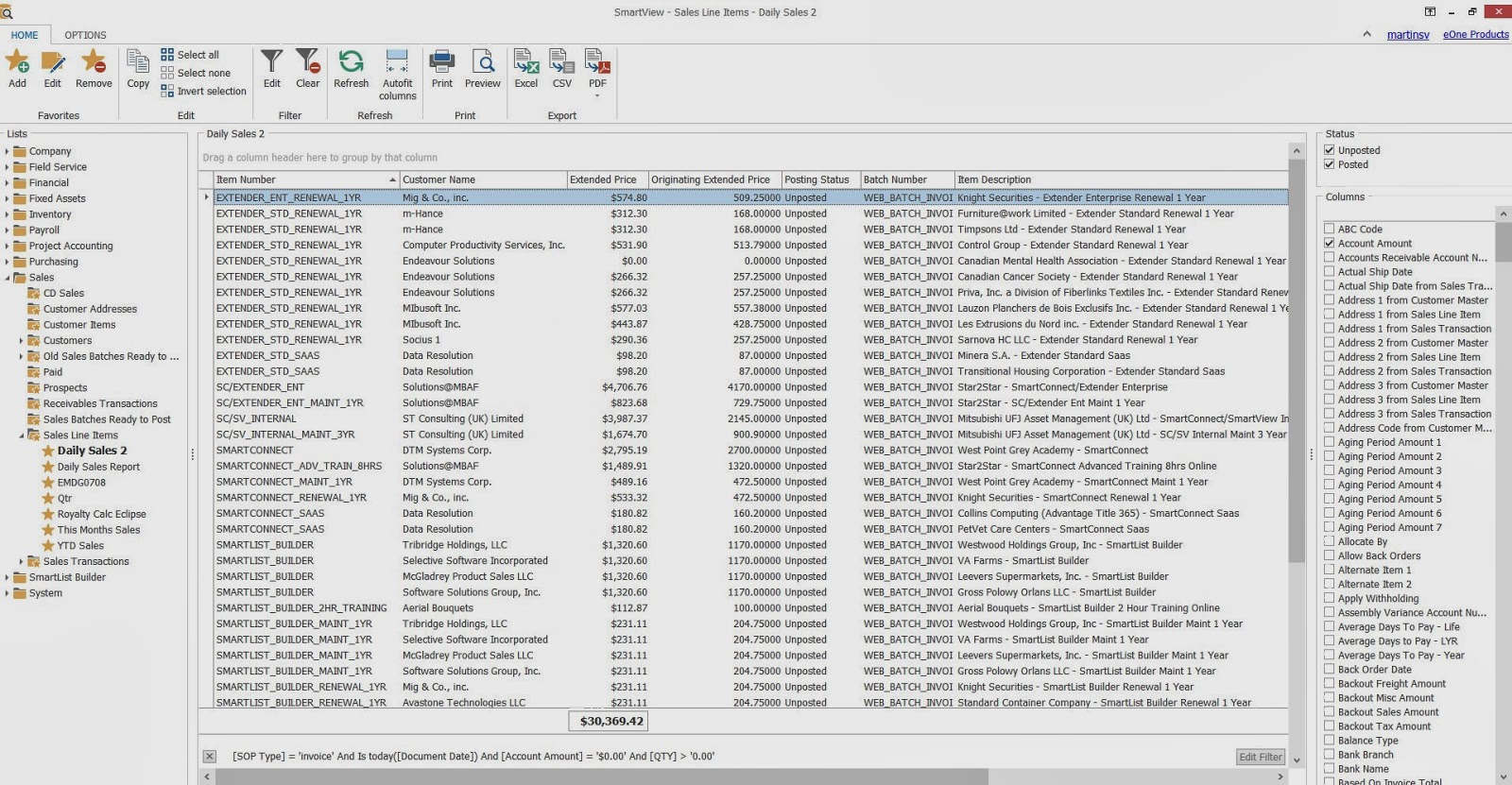
So at 8:00am, I select my Daily Sales list in SmartView. It looks like this below – where there are usually 3-4 small payments from international resellers who have renewed their Extender or SmartList Builder in the early hours of the morning. 


As the day progresses I come back from time to time to check out how the Credit Card website payments are going. Ninety percent of our sales are coming via our website and are integrated directly into GP via SmartConnect. So in SmartView I am looking only at SOP transactions, created today, where the ‘on account amount’ is zero. That means the transaction has been fully paid via Credit Card. My List tends to grow and look like this. 


Each time it refreshes I am first looking at the total at the bottom of the report. As long as the number is going up I am content. Sometimes it jumps by $200 representing a renewal – or sometimes it takes a big jump. I smile. The nice thing about seeing this data is I can tie certain sales back in my mind to a demo, to a reseller visit, or a conversation I have had in the weeks prior. 

Later in the day the list hopefully reaches the full screen and I can no longer see all the transactions. That’s when I know it’s been a good day. My favorite thing in a day is when I have to scroll down! The important thing to me is speed – I am usually very busy. Each refresh takes less than a second, so I am never just waiting on data.


Some days, I want more than just to see how the day, the week or month is tracking.  Let’s say its 3 pm and I already have to scroll down – then I might think – what are we selling today? I simply drag and drop the item column up to the header and I get a report that looks like the following. This is grouped by product. So as per below I can see that there were 9 Extender Renewals, 2 Extender Saas Payments, and a nice Extender/SmartConnect Bundle. 


While I love all our products equally, (like any good parent) I always like to keep a close eye on our SmartConnect Sales. So I then use the drop down filter to look just a SmartConnct sales.


The Result now looks like this.


You’ll notice that I also have lists prepared for "This Month’s Sales", and this "Year to Date Sales".


I use these to give me a snapshot of how the month is tracking and how things are looking by year. When I get a call from a reseller telling me ‘we need a discount on this deal, and we do SOOO much business with you’ – I use these lists to know exactly what a customer has spent with me in the last day, week, month and year. When someone tells me ‘they sell SLB with every deal they do’ – I can check and tell if they are exaggerating or that they actually do not do many GP deals!


Weirdly I never export any of this data to Excel – because I can do exactly what I need to on a daily operational level right there in SmartView.

When it comes to month end analysis I use my Excel Report Builder based reports which leverage all the power of pivot tables, Excel Dashboards, etc. However I will cover this in another article. 

All in all I'm not sure how I ever survived a day in the office without SmartView. 

Want to know more? Email sales@eonesolutions.com. 


Tuesday, February 4, 2014

Tech Tuesday: Using a Multi Source Map to Filter Imported Records in SmartConnect

Today our Tech Tuesday video is from our Senior Technical Consultant, Chris Hanson, highlighting a specific example of the Multi Source in SmartConnect that he covered a few weeks ago here.

The Multi Data Source is one of SmartConnect's newer features, but has plenty of scenarios in which it is useful for. The video below describes how you would set it up in order to bring in just the data that does not already exist in the system.


Interested in learning more about SmartConnect? Feel free to reach out to us at sales@eonesolutions.com for more information!

Thursday, January 30, 2014

SmartView Replaces SmartList - Makes Reporting Easy

Everyday hundreds of Microsoft Dynamics GP customers are experiencing the fast and flexible interface SmartView provides to their everyday business needs. SmartView allows everyone in your organization access to the exact data each person needs to do their job. The quality of SmartView exceeds expectations and is difficult to deny when our customers can't stop talking about it!

Take Wintergreen Learning Materials, with at least 850 orders flowing through Microsoft Dynamics GP per week and a sales staff in need of reports, Wintergreen was in need of an end-user tool for their team. Wayne Murphy, the Manager of IT Services knew they found the perfect solution after watching a SmartView demo video from our website. His team found SmartView to be time saving and easy to use. 

“The users especially liked the fact that they could now easily identify the available fields to add as columns in the SmartList. Just that feature alone has cut down my requests for SmartList changes from 3 requests per week to 1 request every three weeks.”

“We are using SmartView to look at every SmartList we need. From Purchase Order lists, to inventory management, to absolutely every list in Sales, it’s all seen in SmartView.”


SmartView makes working with SmartLists a whole lot easier. You may find the rest of this case study and more on our website here. 

If you own SmartList and are in need of a reporting tool or just want to speed things up to save valuable time and money please feel free to email sales@eonesolutions.com if you have any questions - we'd be happy to assist!

Tuesday, January 28, 2014

Tech Tuesday: Extender Subscription Template Video Series

We have started a new three part video series on Extender templates for Subscriptions. The world has more subscriptions than ever before with all of the cloud services available today. This template is a great starter for anyone that has a subscription business from gym memberships to software subscriptions.

The first video is based on our Standard version, the second on enhancing the solution further with Extender Enterprise, and the 3rd on Reporting and Integrating.I hope you enjoy the series and get some great ideas on how to use Extender to help your business even more.

Watch Videos


Thanks,Chris DewDirector of Product Management


Monday, January 27, 2014

Exclusive SmartConnect, SmartList Builder and Extender Training Before Convergence

We’ve heard your requests loud and clear for training prior to Convergence. With that in mind, we’re pleased to offer the following sessions prior to Convergence in Atlanta:


1.       SmartConnect Deep Dive Training: March 2nd & 3rd from 9 am to 5 pm
      Want to become a SmartConnect guru? This is your chance! Join us for two full days of training and get the skills you need to create the integrations and automations you've always wanted! You’ll walk away a SmartConnect expert.

      Two full days of hands on training, lunches each day and a training guide to take home is $1400/person. If you bring more than one person from your organization, the 2nd person and each person after is only $700/person.

2.       SmartList Builder Training: March 2nd from 1 pm to 5 pm
      If your life around reporting is spent in SmartList and SmartList Builder, join us and become a SmartList Builder Rock star. You’ll receive hands-on training and learn to use ALL aspects of SmartList Builder – including Excel Report Builder, Drill Down Builder, and Navigation List Builder.

        Want to join us? The ½ day session is $700/person.

3.       Extender Training: March 3rd from 9 am to 5 pm
      Learn to make GP sing and dance, without writing code, by becoming an Extender expert.

      The full day session is only $700/person.

Both partners and customers are invited to join us. Once you sign up, we’ll let you know what you need to bring, where to meet us, and all the other need-to-know details!


Unfortunately, there is LIMITED SEATING AVAILABLE. We hate to rush you but please, please, PLEASE sign up as soon as possible so you get a spot in the session of your choice. We have attendees signing up daily and truly don’t want anyone to miss out. Email abbey.cooper@eonesolutions.comfor more details and to reserve your place in training. 

If you can't make it to training, but will be at Convergence, be sure to stop by booth #1140 to say hi and learn more about what's new with eOne.